AI Visio Diagram Generator: How VSDX.ai Works
Learn how VSDX.ai turns PDFs, Word, Excel, images and audio into editable diagrams, then exports native Visio .vsdx files.
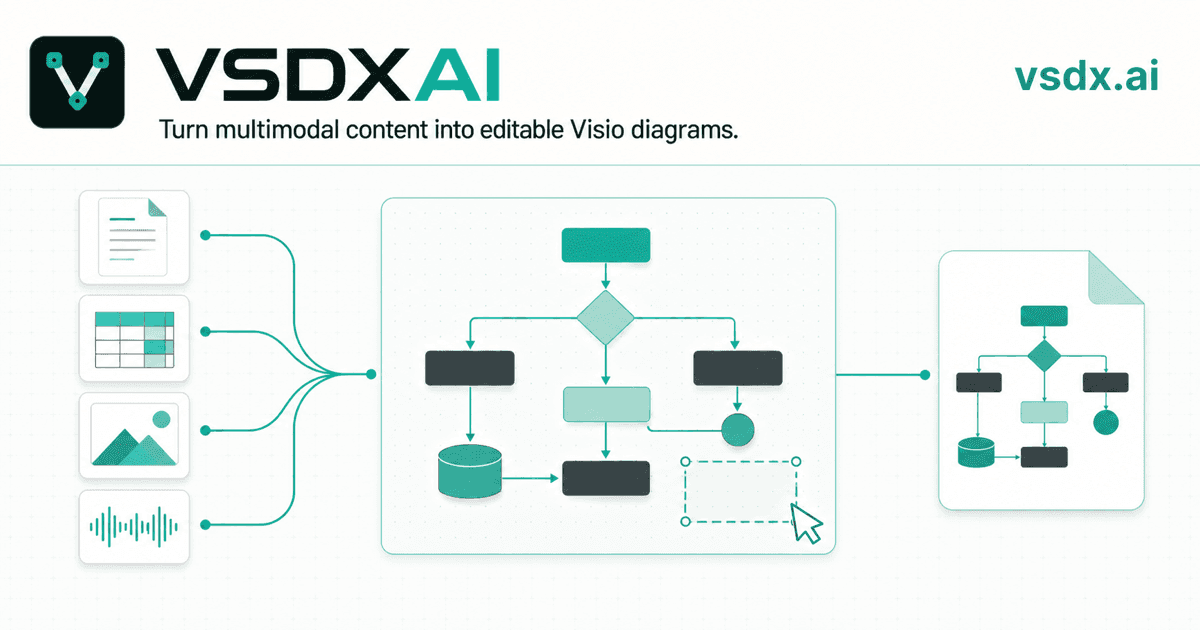
TL;DR: VSDX.ai is an AI diagram workspace built around one deliverable: a native, editable Visio .vsdx file. You describe a process in plain language — or upload the documents, spreadsheets, images, or recordings that describe it — and VSDX.ai proposes a diagram plan grounded in your sources, renders it as an editable draw.io diagram in the browser, and exports it as VSDX, PNG, or SVG. You can try the studio without an account.
The problem: the diagram already exists — just not as a diagram
Most flowcharts and process maps don't start on a canvas. They start as:
- a requirements document or SOP written in prose,
- a spreadsheet of steps, owners, and systems,
- a whiteboard photo or a screenshot of a legacy chart,
- a meeting recording where someone walks through the process.
Getting from any of those to a clean Visio file usually means reading the source, opening a diagramming tool, and redrawing everything by hand — then redrawing it again when the process changes.
VSDX.ai automates exactly that translation step, and keeps the output in formats you can actually keep editing.
What you can feed it
VSDX.ai accepts up to 8 source files per request (20 MB each, 40 MB total), alongside or instead of a text prompt:
- Documents: PDF (up to 100 pages), Word (.docx), Markdown, plain text
- Data: Excel (.xlsx), CSV, JSON, YAML
- Images: PNG, JPEG, WebP, GIF, AVIF — photos of whiteboards, screenshots of old diagrams
- Audio: recordings are transcribed automatically, so a spoken process walkthrough works as a source
Nine diagram types, one Auto mode
VSDX.ai generates flowcharts, cross-functional (swimlane) diagrams, BPMN, organization charts, network topologies, system architecture diagrams, ER diagrams, and UML activity and component diagrams. If you don't specify a type, Auto picks the one that fits your request — and you can switch types in conversation.
Plan first, draw second
A distinctive part of the workflow: VSDX.ai doesn't jump straight from your input to a finished picture. It first analyzes your sources and shows a plan — the steps, actors, and connections it found, each tied to evidence from your material — with a live preview. You confirm the plan, and only then is the final diagram rendered by a deterministic layout engine that keeps connectors clean and routes lines around shapes instead of through them.
This matters for anything you'll show to other people: the diagram reflects what your documents actually say, not what a model vaguely remembers about processes like yours.
Edit by chatting, or edit by hand
The result lands in an embedded draw.io editor — real shapes and connectors, not a static image. From there you can:
- drag, restyle, and rewire anything by hand, exactly as in draw.io;
- or tell the assistant what to change ("add an approval step after review, route rejections back to intake") and let it revise the diagram;
- restore any earlier version from the built-in history if an edit goes the wrong way.
Export: VSDX first
The export menu is built around Visio: one click produces a native .vsdx file in which every box is a real Visio shape and every arrow a real connector — movable, restylable, and ready for colleagues who live in Visio. PNG and SVG exports are there for slides and wikis.
Getting started
The studio is open without an account — you can explore a sample diagram and the editor first. Signing up is free and comes with 20 welcome credits (a generation costs 10 credits, so that's two full diagrams on the house). After that, plans start at $20/month for 300 credits, and one-time credit packs are available if you don't want a subscription.
If your processes live in documents but your deliverables need to be Visio files, that's precisely the gap VSDX.ai is built to close.
More Posts
Visio Alternatives: 6 Options and What Each Is Good For
A practical comparison of Microsoft Visio alternatives, from free draw.io to Lucidchart, with the one question that decides it: do you need to exchange .vsdx files?

What Is a .vsdx File, and How Do You Open One?
A .vsdx file is a Microsoft Visio drawing. Here is what is inside it, how it differs from .vsd, and five ways to open one with or without Visio.
Can ChatGPT Make Visio Diagrams? 3 Current Routes
Compare three current ways to turn ChatGPT output into an editable Visio .vsdx file, including Mermaid, Visio Plan 2 and VSDX.ai.
Newsletter
Join the community
Subscribe to our newsletter for the latest news and updates